Short answer: Check /pricing for current plan inclusions, then open the in-app usage view for your account's remaining amounts and reset timing. Under the current paid plan policy, GPT Images have no plan-period total, although batch, concurrency, queue, safeguards, and provider availability still apply. Grok media has a separate allowance, and videos can use different amounts based on their settings. Motion16 Edit also has its own allowance. Use the estimate shown before submission to translate a plan allowance into a realistic project count.
Start by naming the workflow you plan to use
‘How many creations?’ sounds simple, but an image, an edit, and a video are different jobs. First list the expected mix: GPT Images for concept exploration, Grok media for selected image or video work, and Motion16 Edit for targeted changes. Each category can have its own plan rules.
This prevents a misleading calculation such as dividing one generic number by every button in the app. Motion16 exposes separate usage categories because their infrastructure and request costs differ. Plan around the workflow mix you actually need, not an imaginary average output.
Understand the paid GPT Image policy precisely
Current paid plans do not set a plan-period total for GPT Images. That means there is no stated monthly or lifetime GPT Image counter for an active paid plan under the current policy. It does not promise infinite work at the same moment or uninterrupted upstream availability.
Batch size, concurrent generation, queue capacity, safeguards, and provider availability remain practical controls. Think of this as open-ended generation over the plan period with controlled throughput. The live /pricing page is authoritative if the policy changes.
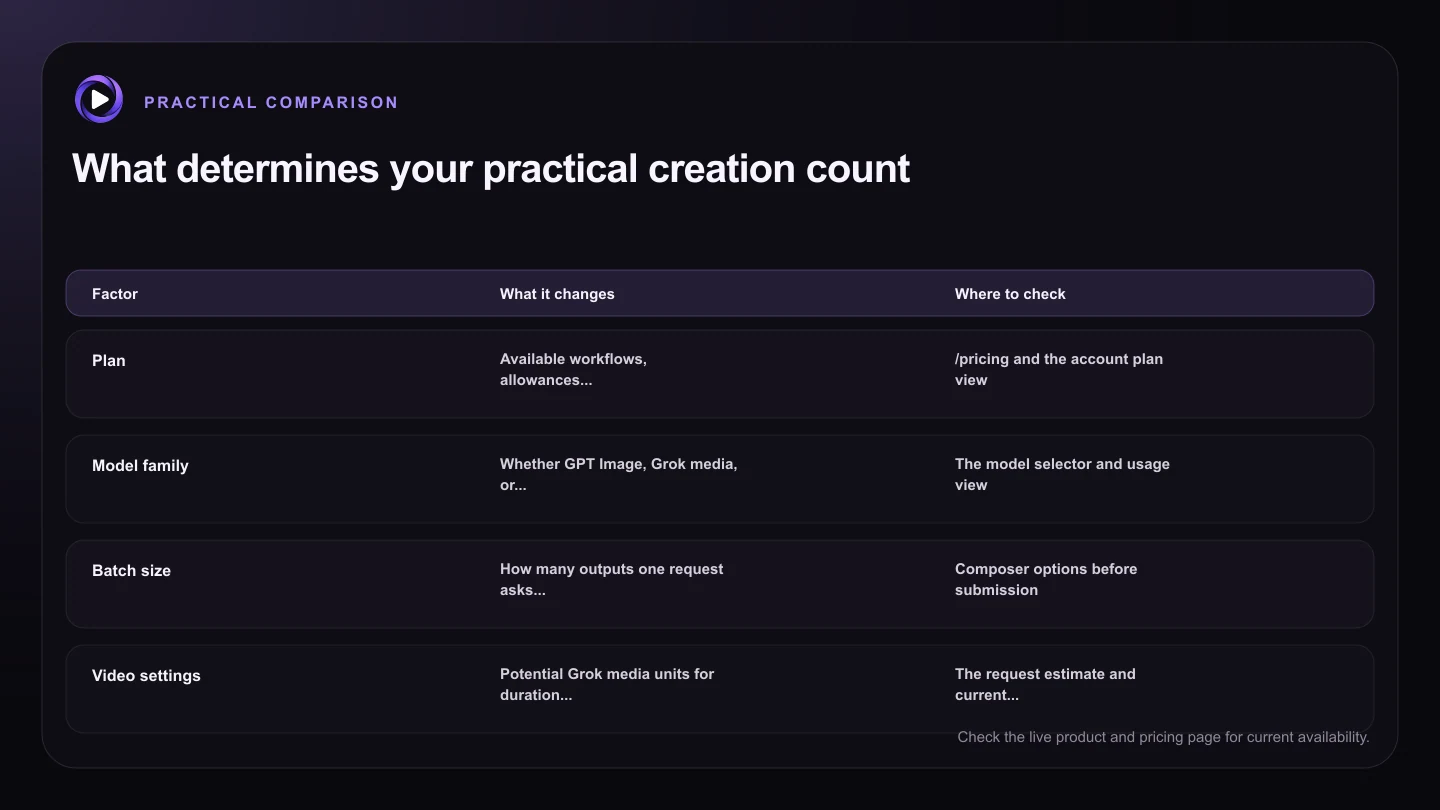
| Factor | What it changes | Where to check |
|---|---|---|
| Plan | Available workflows, allowances, and throughput | /pricing and the account plan view |
| Model family | Whether GPT Image, Grok media, or Motion16 Edit rules apply | The model selector and usage view |
| Batch size | How many outputs one request asks for | Composer options before submission |
| Video settings | Potential Grok media units for duration and resolution | The request estimate and current controls |
| Queue and provider status | How quickly eligible work can start and finish | Project status and service messaging |
Translate a Grok media allowance into your likely mix
Grok images and videos draw from a separate Grok media allowance. To estimate output, note the displayed unit need for each planned request. A batch can use more than a single image request, and video can require more units depending on settings such as duration and resolution.
Build two estimates: a draft-heavy week and a delivery-heavy week. The draft plan might use shorter, lower-resolution motion tests where appropriate. The delivery plan reserves more allowance for final settings and a few retries. This range is more useful than promising one exact count before you know the request mix.
Separate included allowance from processing capacity
Remaining allowance does not mean every request can start immediately. A plan can limit batch size, active jobs, or queued jobs. Shared service demand and provider availability can also affect processing. These controls manage flow, while allowance tracks eligible usage.
If your production schedule is tight, allow time for queues and review. Submit sensible batches, select winners before launching more, and avoid filling the queue with nearly identical work. A clear selection habit often stretches practical output further than chasing the largest theoretical count.
Use live numbers instead of an old blog estimate
Pricing, plan allowances, provider options, and safeguards can change. Check /pricing before purchase and use the app's usage screen for account-specific information. The request controls should show relevant settings and any available usage guidance before you submit.
Track completed outputs that advance the project, not only total generations. Ten near-duplicates may count as ten outputs but deliver less value than three clearly tested directions. Organize work by decision, keep prompts with their results, and reserve higher-cost requests for ideas that passed the draft stage.
Try this next
A practical checklist for your next test
- List the expected number of image, edit, and video requests separately.
- Confirm current plan details on /pricing.
- Read the displayed unit need for each Grok media configuration.
- Reserve final video settings for directions that pass a draft test.
- Allow for queues, review time, and occasional retries.
- Measure usable project outputs, not just button clicks.
Frequently asked questions
How many GPT Images can I create on a paid Motion16 plan?
Current paid plans have no plan-period GPT Image total. Batch, concurrency, queue, safeguards, and provider availability still apply. Review /pricing for the current policy.
How many Grok videos can I make from my allowance?
It depends on the plan and the units required by each selected video configuration. Duration, resolution, and workflow can affect usage, so use the current in-app estimate rather than a universal count.
Is Motion16 Edit included in the Grok media allowance?
No. Motion16 Edit has a separate allowance. The usage view keeps it distinct from Grok media and from the current paid GPT Image policy.
Keep exploring: Read How Do Grok Image and Video Limits Work in Motion16?, or check the current Motion16 plans and limits.