Short answer: Motion16 tracks supported Grok images and videos through a separate Grok media allowance. A request can use one or more units depending on the workflow and settings, and video can require more capacity than a single image. The app shows remaining usage and reset information for your plan. Paid GPT Images do not have a plan-period total under the current policy, but operational controls still apply, while Motion16 Edit has its own allowance. Plan details can change, so confirm current amounts on /pricing and in the app.
Grok media is one plan category with different request costs
Motion16 groups supported Grok image and Grok video activity under a Grok media allowance. The category keeps that usage distinct from GPT Image generation and Motion16 Edit. When a request is submitted, the app can show what it needs and whether enough allowance is available.
Not every media request has the same cost. A single image, a batch of images, and a video with a chosen duration or resolution can require different numbers of units. Read the estimate shown for the request instead of assuming that one click always equals one unit.
Allowance and throughput are different limits
An allowance answers how much eligible media your plan includes during its stated period. Throughput controls answer how much work can be submitted, active, or queued at one time. Reaching a batch or queue limit does not necessarily mean the recurring allowance is gone.
This distinction also explains why a request may wait even when units remain. Active capacity, shared service conditions, safeguards, or provider availability can affect when work starts. The project status should tell you whether a job is queued, running, complete, failed, or canceled.
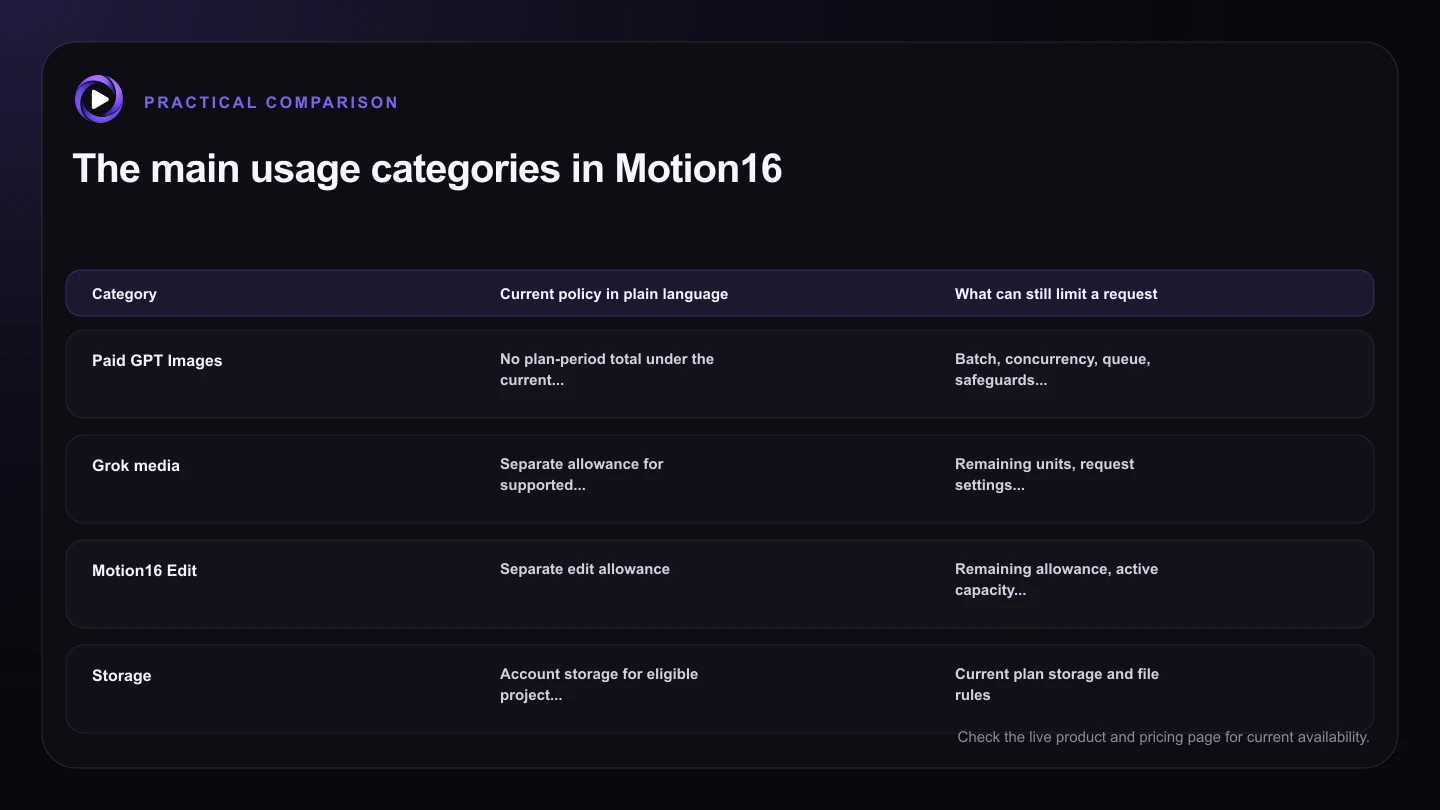
| Category | Current policy in plain language | What can still limit a request |
|---|---|---|
| Paid GPT Images | No plan-period total under the current policy | Batch, concurrency, queue, safeguards, and provider availability |
| Grok media | Separate allowance for supported Grok images and video | Remaining units, request settings, throughput, and provider availability |
| Motion16 Edit | Separate edit allowance | Remaining allowance, active capacity, safeguards, and service availability |
| Storage | Account storage for eligible project media | Current plan storage and file rules |
| Shared capacity | Operational capacity across active work | Current demand and service controls |
Video settings can change expected usage
Video generally asks the provider to create many related frames, so it can use more allowance than an image. Duration and resolution are common factors because a longer or larger clip requires more work. The request controls and current usage messaging are the best place to see what applies to the selected option.
Choose settings for the decision you are making. A shorter or lower-resolution draft may be enough to test motion direction before spending more allowance on a stronger candidate. Do not reduce settings automatically if the final use truly needs them, but avoid paying for detail before the movement works.
GPT Image and Motion16 Edit stay separate
Under the current paid plan policy, GPT Images have no plan-period total. That does not include Grok media, and it does not remove GPT batch, concurrency, queue, safeguard, or provider-availability controls. The word unlimited describes the paid GPT Image plan-period total only.
Motion16 Edit has a separate allowance because it is a different workflow with different infrastructure. Keeping the categories visible makes it easier to understand what a project used. It also avoids the confusion of one generic credit number hiding very different image, edit, and video costs.
Use the live plan and usage views as the source of truth
Plan amounts, prices, included options, and service rules can change. Review /pricing before subscribing or planning a campaign, then use the in-app usage view for your account's remaining allowance and reset timing. An older article or screenshot should not override the live product display.
If a request fails, check its status before immediately trying again. Failed or interrupted provider work may be handled differently from a completed output, depending on the current accounting rules. Clear job states help you decide whether to wait, retry, simplify the request, or contact support.
Try this next
A practical checklist for your next test
- Check the current plan amounts and terms on /pricing.
- Review the request's displayed unit need before submitting.
- Use draft video settings to validate motion when appropriate.
- Keep allowance separate from batch, active, and queue limits.
- Read job status before retrying a failed or delayed request.
- Use the in-app usage view for remaining amounts and resets.
Frequently asked questions
Does one Grok video always use one unit?
Do not assume that it does. Grok media requests can use different amounts depending on workflow and settings such as video duration or resolution. Check the current estimate in the app.
Do unlimited paid GPT Images include Grok images?
No. Grok media has a separate allowance. The current paid GPT Image policy removes a plan-period GPT Image total, while operational controls and provider availability still apply.
Where can I see when my Grok allowance resets?
Use the Motion16 usage view for account-specific remaining usage and reset information. Check /pricing for the current public plan details, since plan terms can change.
Keep exploring: Read How Many AI Images and Videos Can I Create With Motion16?, or check the current Motion16 plans and limits.