Short answer: Yes. Motion16 runs as a browser-based creative workspace and supports connected workflows for GPT Image, Grok media, Motion16 Edit, references, batches, project history, and image-to-video. You still need a compatible browser, an internet connection, and an account for saved work. Model access and generation capacity depend on the current service and plan.
Why browser-based creation is useful
A browser removes the setup work that often gets in the way of a quick idea. There is no model checkpoint to configure, no local GPU requirement, and no creative application that needs to be kept in sync across devices. You can open the workspace, attach a reference, and begin from the machine you already have.
The larger benefit is consistency. The same project interface can be opened from a laptop, desktop, or phone. That makes a browser workspace especially handy for people who capture references on mobile, review on a laptop, and deliver files from another computer.
What happens to your files and project context
A browser tool should not feel temporary. In Motion16, generated media and the project trail are organized in the workspace so you can return to an earlier version, reuse a source, or continue into an edit. This is different from treating each prompt as a disconnected chat message.
Uploads still take time, especially on a slow network. Let each reference finish attaching before you submit, and keep local originals of files that matter. Project history is useful working context, but it should not be your only long-term archive for client masters or irreplaceable source photography.
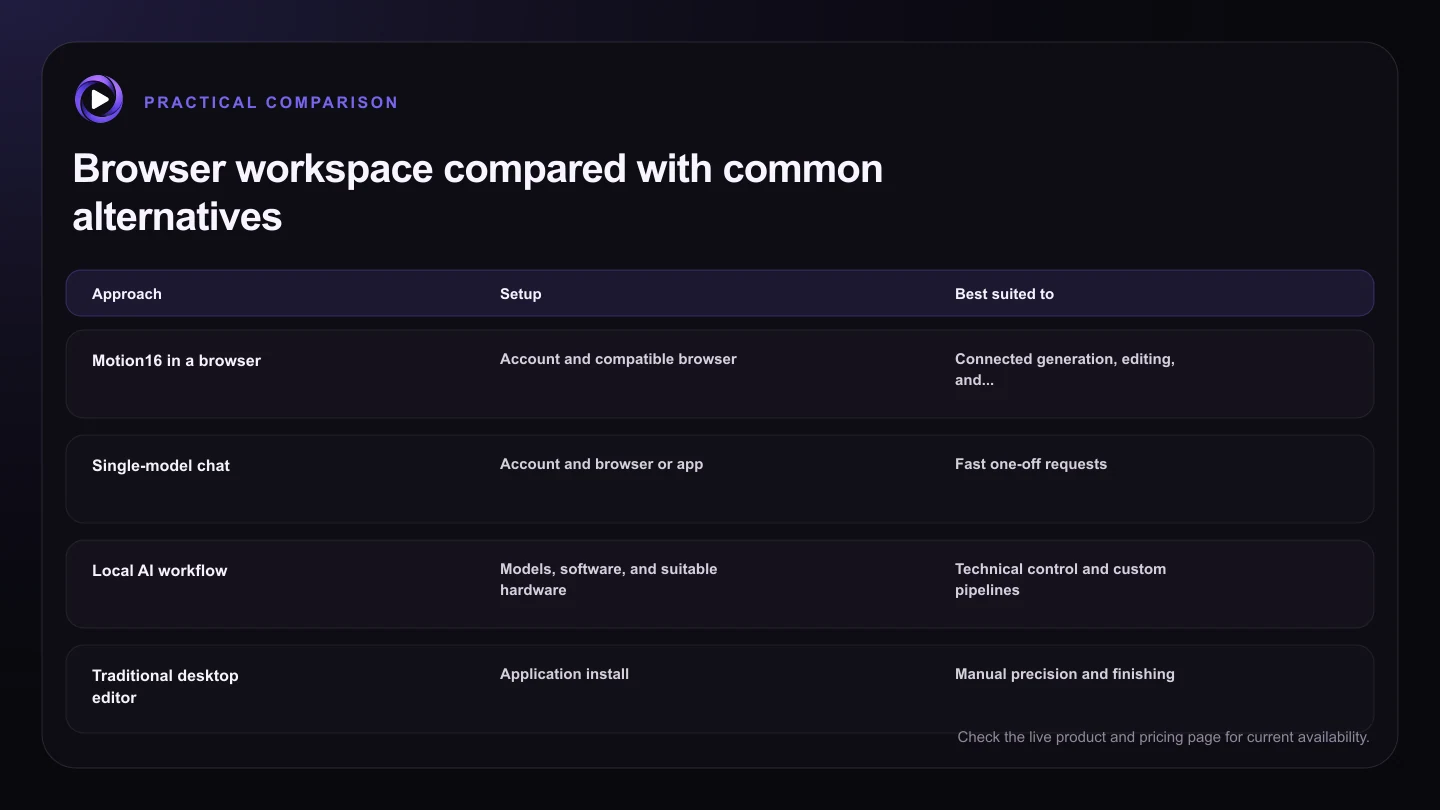
| Approach | Setup | Best suited to | Main tradeoff |
|---|---|---|---|
| Motion16 in a browser | Account and compatible browser | Connected generation, editing, and video | Depends on internet and plan capacity |
| Single-model chat | Account and browser or app | Fast one-off requests | Projects can become fragmented |
| Local AI workflow | Models, software, and suitable hardware | Technical control and custom pipelines | More setup and maintenance |
| Traditional desktop editor | Application install | Manual precision and finishing | AI generation may need another tool |
Browser workspace versus local generation
Local generation gives experienced users deep control over models, nodes, extensions, and hardware. It also asks them to manage installations, storage, updates, and performance. A browser workspace trades some of that low-level control for a guided workflow that is easier to open and share across devices.
Neither approach wins for everyone. If you enjoy tuning custom pipelines and own a capable GPU, local tools may suit you. If you want to move between supported GPT Image, Grok media, edits, batches, and short video without maintaining the infrastructure, Motion16 is the simpler route.
How to test browser compatibility before a deadline
Before committing a client project, run a small end-to-end test in the browser and device you plan to use. Upload one normal source image, create one output, reopen it from history, and download it. If video is part of the job, test a short image-to-video request too.
Also check practical restrictions outside Motion16. Corporate networks, privacy extensions, aggressive battery-saving modes, and limited mobile storage can interrupt uploads or downloads. A five-minute rehearsal is a better safeguard than discovering a blocked file picker during an approval call.
Try this next
Five-minute browser readiness check
- Open Motion16 in the browser you plan to use.
- Sign in and confirm that your project history loads.
- Upload one representative reference image.
- Run a small image generation or edit.
- Reopen and download the result.
- Check the live usage panel before a larger batch.
Frequently asked questions
Does Motion16 require a powerful computer?
The generation work is handled through the service, so you do not need to run the supported models on your own GPU. Your device still needs a compatible browser and enough memory to display media smoothly.
Can I use Motion16 without an internet connection?
No. Uploads, model requests, project syncing, and downloads require an internet connection.
Will every browser extension work with Motion16?
Not necessarily. Strict content blockers, privacy tools, or managed network policies can interfere with authentication, uploads, or storage. Test your normal setup before important work.
Keep exploring: Read Which Grok Alternative Is Best for Mobile Creators?, or check the current Motion16 plans and limits.