Short answer: Motion16 can support character consistency by keeping source references, generations, focused Motion16 Edit requests, and project history connected. A clear reference and controlled edit usually give the model a better chance of preserving identity than recreating the character from text. No generative edit should be assumed to keep every facial, clothing, or anatomical detail perfectly, so compare each result with the approved source.
Create a reference that is easy to recognize
Choose a source where the face is visible, the lighting is understandable, and important features are not hidden behind hair, hands, or extreme perspective. If wardrobe or silhouette defines the character, make sure those details can also be read. A beautiful but ambiguous image is a weak identity reference.
Write a short character note for yourself. Include stable traits such as face shape, hair, age range, signature clothing, and a few distinctive details. Keep it factual rather than poetic. This note helps you repeat the same priorities when a later scene changes the pose, setting, or camera angle.
Change one important thing at a time
The more a request changes at once, the more room the model has to reinterpret the person. Moving a character from a bright portrait to a wide night action scene while changing wardrobe and expression creates several difficult problems in one step. Split the transformation into stages when identity matters.
Use Motion16 Edit for focused instructions such as changing the jacket color, placing the character in a quiet cafe, or adding a gentle smile while preserving the person. After each edit, choose the most faithful result as the source for the next step. This creates a controlled path instead of a chain of increasingly random reinventions.
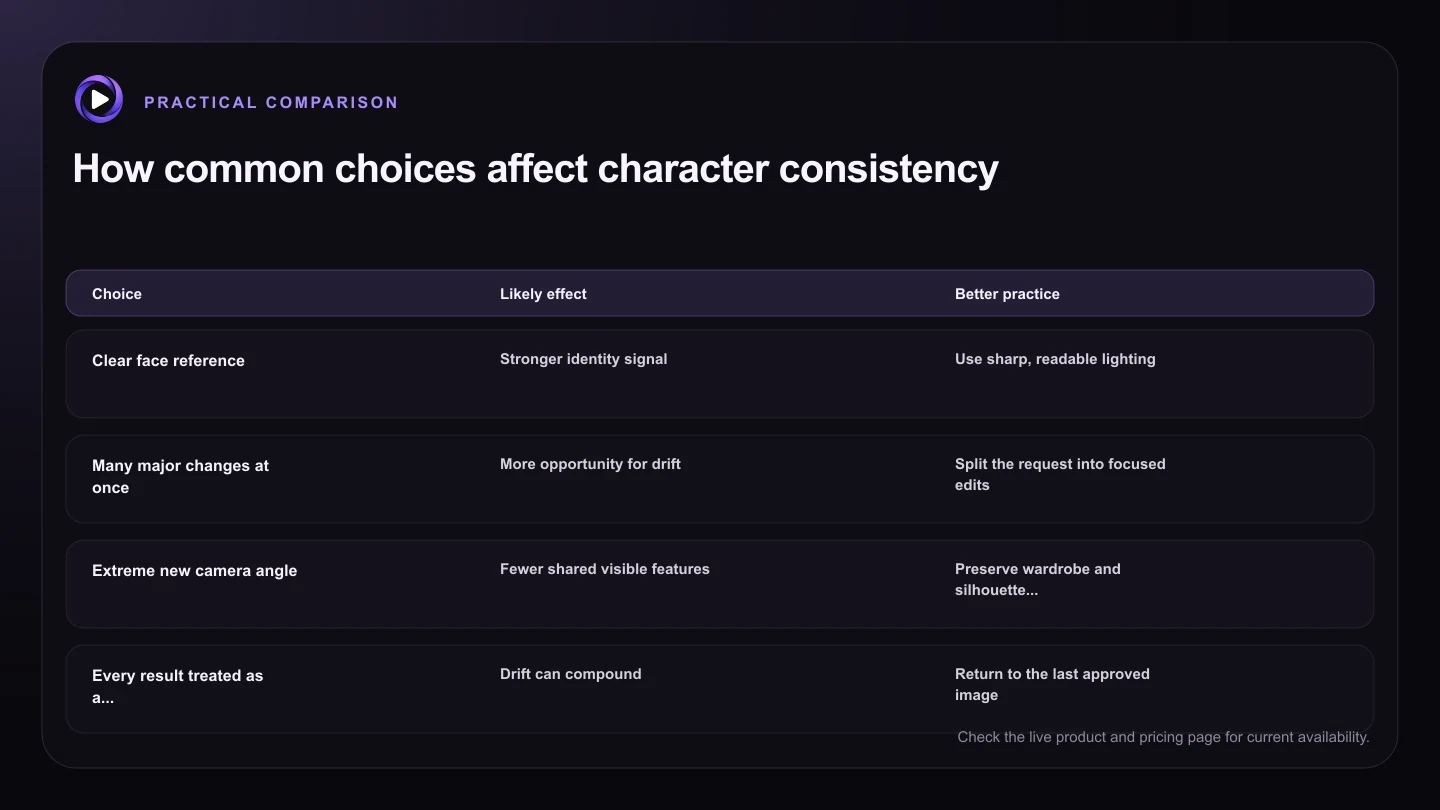
| Choice | Likely effect | Better practice |
|---|---|---|
| Clear face reference | Stronger identity signal | Use sharp, readable lighting |
| Many major changes at once | More opportunity for drift | Split the request into focused edits |
| Extreme new camera angle | Fewer shared visible features | Preserve wardrobe and silhouette cues |
| Every result treated as a new source | Drift can compound | Return to the last approved image |
| Small approved reference set | Easier comparison | Keep face, body, and key wardrobe views |
Know what tends to cause identity drift
Large pose changes, hidden faces, dramatic lens changes, strong stylization, and low-resolution sources can all weaken identity. A model may preserve the broad idea of a character while changing the eyes, jaw, hairline, or body proportions. Group scenes add another challenge because features can migrate between people.
Do not solve drift by filling the prompt with anxious repetition. Instead, return to the best approved source, reduce the number of changes, and state the stable traits once in a clear sentence. If the requested camera angle makes the original features impossible to see, accept that the review will need to focus on other identity signals such as hair, wardrobe, and silhouette.
Build a small character system inside the project
Keep a few approved references that serve different purposes: a clean face view, a full-body view, and perhaps a wardrobe or style reference. Avoid saving every generation as equally authoritative. A small reference set makes it easier to recognize when a later image has drifted.
Use project history to retain the branch that produced each approved frame. Name or document the scene and the change you requested outside the prompt if your production needs a formal record. Before animation, choose the still that best balances identity, composition, and clean detail because the source influences the video that follows.
Try this next
Character consistency check
- Start from a sharp reference with readable features.
- Write down the traits that must stay stable.
- Change one important visual variable at a time.
- Compare face, hair, proportions, and signature clothing.
- Continue from the last approved result, not any result.
- Choose the cleanest consistent still before animation.
Frequently asked questions
Does Motion16 have a perfect character lock?
No. References and focused editing can improve consistency, but generative models can still alter identity details and every result should be reviewed.
Is one reference image enough?
It can be enough for a close edit. For varied scenes, a small approved set showing the face, body, and important wardrobe can provide clearer guidance.
Should I keep editing the newest result?
Only if it remains faithful. When drift appears, return to the last approved source rather than allowing errors to compound through more edits.
Keep exploring: Read Can I Use Reference Images in a Grok Imagine Alternative?, or check the current Motion16 plans and limits.