Short answer: Motion16 is a useful Grok alternative for storyboard and video concept work because it connects image generation, references, batches, Motion16 Edit, project history, and image-to-video. You can explore key frames, refine a selected composition, and test simple motion without moving the idea through several disconnected tools. The generated material is best treated as planning and communication, not a guarantee of how a final production or longer video will behave.
Break the idea into beats before generating frames
A storyboard becomes clearer when each frame has a job. Write the sequence as short beats: who is present, what changes, what the audience learns, and where the camera is. A six-frame story with distinct decisions is more useful than twenty attractive images that do not connect.
For each beat, name the shot size and the key action. You might need a wide frame to establish a lonely station, a medium frame for the character noticing a light, and a close-up for the decision to follow it. That structure gives the model something concrete to visualize and gives collaborators something concrete to discuss.
Use references to establish the visual world
Collect a small set of references for the parts of the concept that matter most: character, location, wardrobe, color, or camera language. Do not attach a pile of contradictory images and expect the model to negotiate the art direction. Tell it what each important reference contributes.
Generate a few options for the opening or anchor frame first. Once the team likes the world, reuse that selected image as context for later frames and focused edits. This does not guarantee perfect continuity, but it provides a stronger visual anchor than rebuilding every shot from text alone.
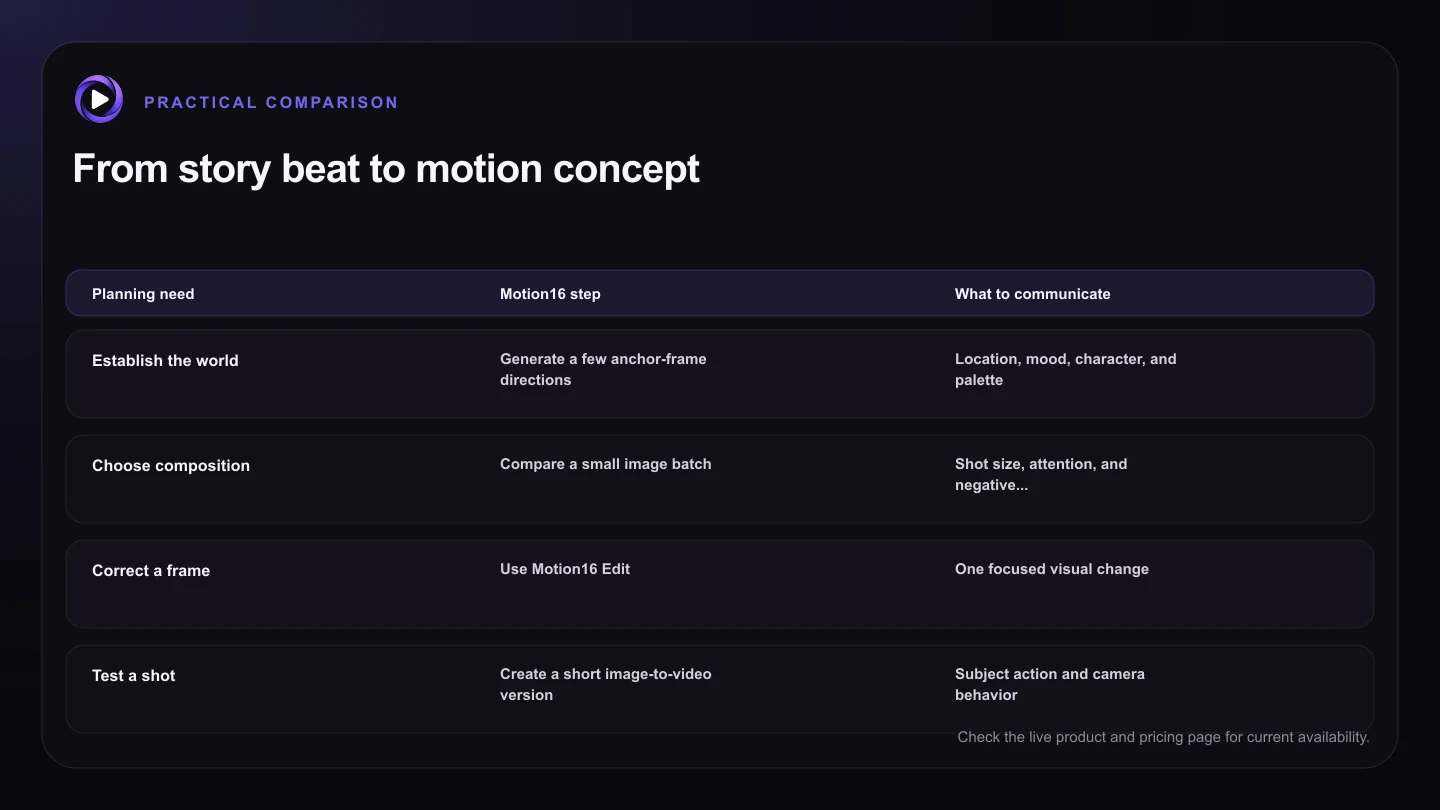
| Planning need | Motion16 step | What to communicate |
|---|---|---|
| Establish the world | Generate a few anchor-frame directions | Location, mood, character, and palette |
| Choose composition | Compare a small image batch | Shot size, attention, and negative space |
| Correct a frame | Use Motion16 Edit | One focused visual change |
| Test a shot | Create a short image-to-video version | Subject action and camera behavior |
| Share the sequence | Organize selected frames in project history | Beat, timing, status, and placeholders |
Keep framing decisions separate from motion tests
Settle the still composition before asking it to move. If the frame does not clearly communicate the subject, direction of attention, and space around the action, motion usually makes the confusion harder to diagnose. Motion16 Edit can help adjust one distracting detail without discarding the overall frame.
When the key frame works, use image-to-video as a previs experiment. Ask for one main subject action and one camera behavior, such as a slow push while the character turns toward the window. A short test can reveal whether the shot idea feels calm, tense, fast, or unreadable.
Present the storyboard as decisions, not final pixels
A director, client, or crew needs to know what is approved about each frame. Add notes for the intended action, camera, dialogue beat, timing, and any element that is only a placeholder. If an AI image contains an accidental prop or imperfect face, mark that clearly so nobody treats it as part of the plan.
Keep alternate routes available, but identify one current sequence. Project history is helpful for retaining earlier ideas while the main board stays readable. When the concept moves into production, use the storyboard to guide planning, then adapt to the real location, performer, lens, budget, and safety needs.
Try this next
Storyboard frame checklist
- Give every frame one clear story purpose.
- Name the shot size and main action before prompting.
- Use a small, intentional reference set.
- Approve the still composition before testing motion.
- Label placeholders and accidental generated details.
- Keep one current sequence easy to identify.
Frequently asked questions
Can Motion16 generate a complete storyboard in one prompt?
You can explore several images, but building and reviewing the sequence beat by beat usually gives clearer framing and continuity.
Will a storyboard character stay identical in every frame?
Not automatically. Reusing a strong reference and changing one major variable at a time can improve consistency, but each frame still needs review.
Is an image-to-video test the same as final animation?
No. It is useful for testing motion and tone, but final production can require more control, continuity, sound, editing, and finishing.
Keep exploring: Read Can Motion16 Preserve a Character Across Image Edits?, or check the current Motion16 plans and limits.