Short answer: Start with one visible action, add a simple camera instruction, describe the intended pace, and name the details that should remain stable. A prompt such as ‘She looks toward the window, her hair moving gently in the breeze, while the camera makes a slow push in’ gives the model a clearer job than ‘make this cinematic and amazing.’ Motion16 keeps the source, prompt, result, and next iteration together so you can improve one variable at a time.
Begin with what is already in the image
The source frame is the first part of the prompt, even though it is visual rather than written. Before typing, look at the subject's pose, gaze, clothing, surrounding objects, and available space. Ask what movement could naturally begin from that exact moment. A seated person can turn their head or lean forward more easily than they can suddenly sprint across the room.
Use the written prompt to continue the scene instead of replacing it. If the image shows a quiet product shot, describe a small lighting change, a controlled camera move, or a gentle environmental motion. Asking for a crowded new scene, several new props, and a complete wardrobe change gives the model too many reasons to invent details or lose the original composition.
Write one clear subject action
Put the main action near the beginning. ‘The cyclist starts pedaling and looks ahead’ is easier to interpret than a long mood paragraph that only mentions the movement at the end. Use concrete verbs such as turns, lifts, walks, smiles, opens, or reaches. They describe something a viewer can actually see.
One clip can contain a short sequence, but the actions should connect naturally. ‘He looks down, picks up the cup, and takes a small sip’ is coherent. ‘He dances, changes clothes, runs outside, and enters a car’ asks for multiple scenes and large state changes. Save a second idea for a second generation or a continuation.
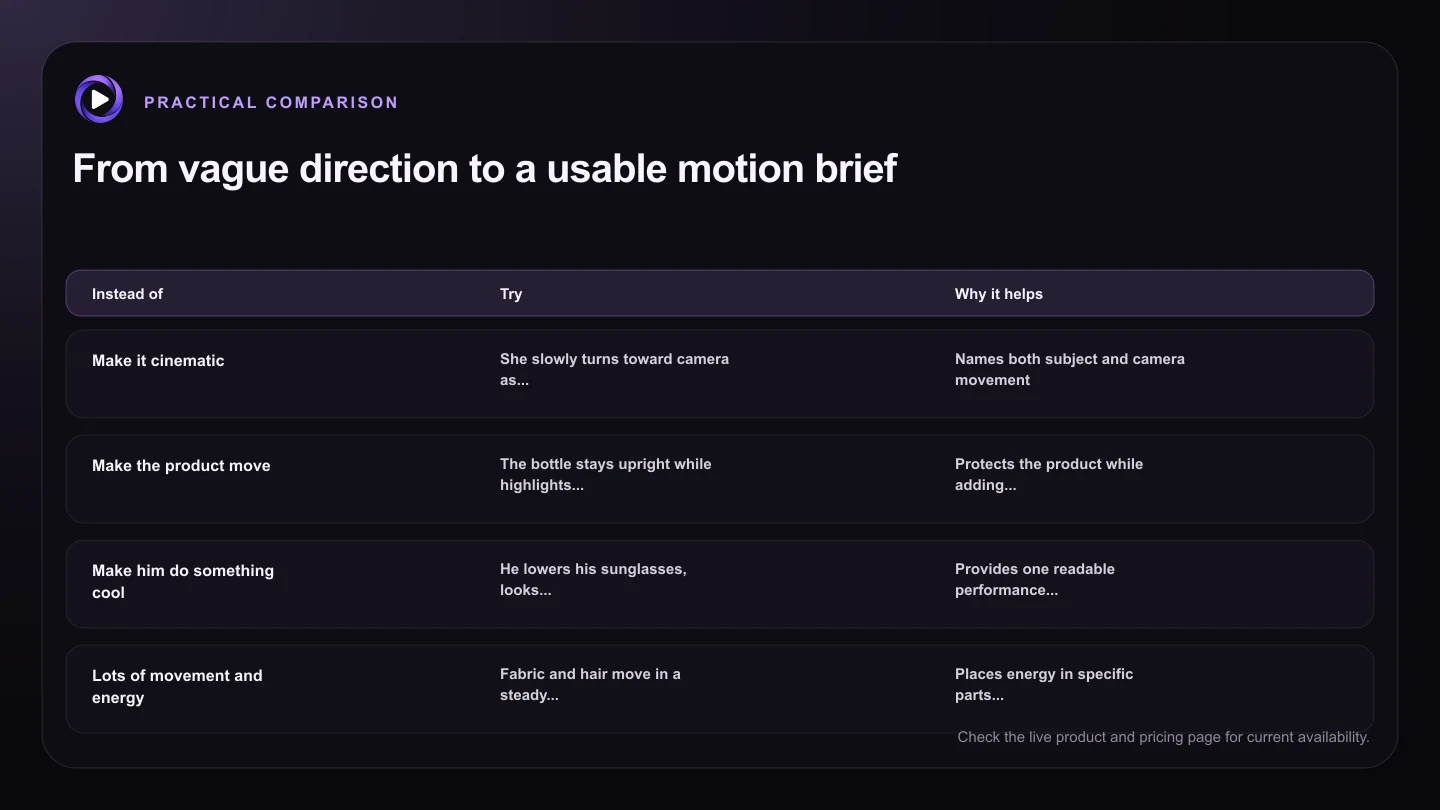
| Instead of | Try | Why it helps |
|---|---|---|
| Make it cinematic | She slowly turns toward camera as the camera makes a gentle push in | Names both subject and camera movement |
| Make the product move | The bottle stays upright while highlights travel slowly across the glass | Protects the product while adding visible motion |
| Make him do something cool | He lowers his sunglasses, looks into camera, and gives a slight smile | Provides one readable performance beat |
| Lots of movement and energy | Fabric and hair move in a steady breeze while the camera remains fixed | Places energy in specific parts of the frame |
| Zoom, pan, orbit, dramatic shot | A slow clockwise orbit keeps the subject centered | Uses one compatible camera instruction |
Separate camera movement from subject movement
Say what the camera does in its own phrase. Useful starting points include a slow push in, a gentle pull back, a fixed camera, a subtle handheld drift, or a smooth pan to the right. If the camera should stay still, say so. A stable camera often helps when the subject action is already complex.
Avoid stacking several camera commands that fight each other. A prompt that requests a zoom, orbit, whip pan, and overhead transition in six seconds leaves little room for the subject. Choose the camera move that supports the story beat. For a reaction, a slow push in may be enough. For a product reveal, a measured orbit may make more sense.
Describe pace and physical behavior
Words such as slowly, gently, naturally, or with restrained movement can be useful when they modify a specific action. ‘The curtain sways gently’ is clearer than adding ‘smooth’ five times. If speed matters, connect it to the moment: ‘She turns gradually, then pauses and smiles.’
Physical cues can reduce floaty motion. Mention weight, contact, or resistance where appropriate: feet remain planted, the hand stays on the table, fabric responds lightly to the breeze, or the bottle remains upright. These constraints are short, but they give the motion a believable relationship to the scene.
Improve the prompt through controlled iterations
Do not rewrite everything after one imperfect result. If the face is stable but the camera is too active, keep the subject action and replace only the camera phrase. If the action begins too late, shorten the setup and move the verb to the first sentence. Small revisions teach you which instruction changed the clip.
Motion16 makes that process easier because the source image, prompt, and generated clips can stay in one project. Compare versions side by side, keep the best movement, and build the next prompt from evidence rather than memory. Results still vary by source and provider, so a clear workflow matters as much as a clever sentence.
Try this next
A practical checklist for your next test
- Choose an action that can begin from the source pose.
- Put one clear subject action near the start of the prompt.
- Use one camera direction, or request a fixed camera.
- Add pace, contact, or stability details only where they matter.
- Change one prompt variable when comparing the next result.
- Keep the source and versions together in one Motion16 project.
Frequently asked questions
How long should a Grok image-to-video prompt be?
There is no perfect word count. One to three focused sentences are often enough for a short clip. Include the main action, camera behavior, pace, and any essential stability requirement before adding style language.
Should I describe everything visible in the source image?
Usually not. The image already supplies much of the appearance and composition. Describe what should change and mention only the existing details that must remain stable.
Can a prompt guarantee the same face and clothing?
No prompt can guarantee a result. Clear, restrained motion and a suitable source image can improve consistency, but provider behavior and generation variation still apply.
Keep exploring: Read Why Does an AI Video Change the Face or Source Image?, or check the current Motion16 plans and limits.