Short answer: Choose a source image that can naturally lead into the action, keep the first clip focused on one motion beat, and describe pace with specific physical cues. Use a fixed camera or one gentle camera move while testing. Then review where motion becomes unstable and change only that instruction. Smoothness is not just a prompt adjective. It comes from matching the requested movement to the source, duration, and amount of new visual information the model must create.
Pick a source pose with somewhere to go
A good starting frame contains a believable next moment. A person standing with balanced posture can take a slow step, turn, or reach. A subject frozen mid-jump may be visually exciting, but it asks the model to resolve momentum, landing, clothing, hair, and camera perspective all at once.
Look for clean silhouettes and visible contact points. Feet, hands, furniture, and held objects help define how the subject relates to the scene. If limbs overlap heavily or an important object is partly hidden, a simple movement can still force the model to reconstruct anatomy or geometry.
Build the clip around one motion beat
A short clip works best when viewers can describe its main action in one sentence. ‘She turns toward the light and smiles’ is a complete beat. The movement has a beginning, a change, and a calm endpoint. It does not need three locations or a chain of unrelated gestures.
If you want a longer sequence, create it as connected shots or continuations. First establish the look and character with a controlled motion. Then use the strongest result as the basis for the next step when the workflow supports it. This is easier to evaluate than requesting an entire commercial in one generation.
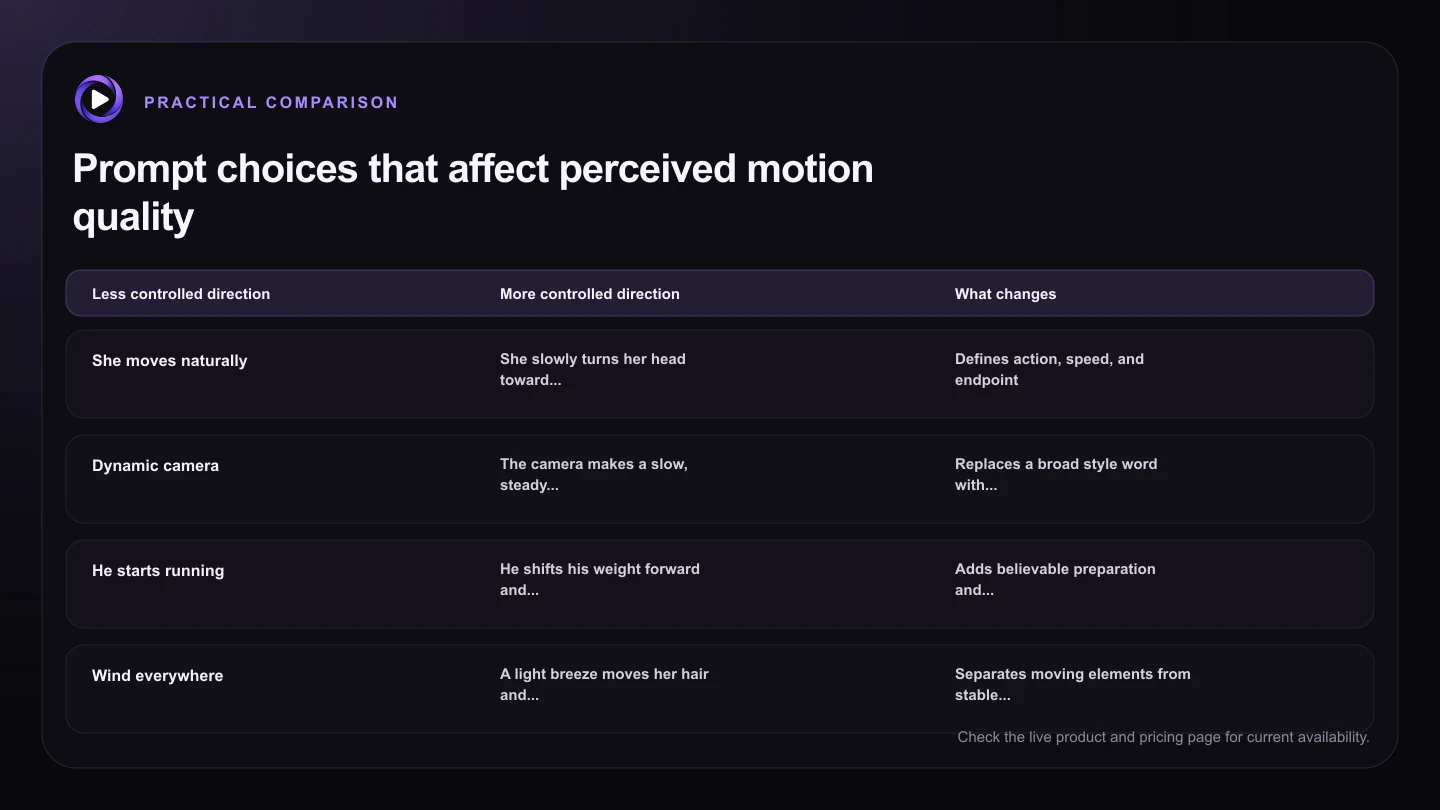
| Less controlled direction | More controlled direction | What changes |
|---|---|---|
| She moves naturally | She slowly turns her head toward the window, then pauses | Defines action, speed, and endpoint |
| Dynamic camera | The camera makes a slow, steady push in | Replaces a broad style word with one move |
| He starts running | He shifts his weight forward and takes two measured steps | Adds believable preparation and limited scope |
| Wind everywhere | A light breeze moves her hair and the curtain while objects remain still | Separates moving elements from stable ones |
| Make a whole scene | The subject completes one action in the existing setting | Reduces scene invention and abrupt transitions |
Use camera restraint to make subject motion readable
Camera motion changes every pixel, so it can multiply the difficulty of an already active scene. Start with a fixed camera when testing walking, hand movement, or facial expression. Once the subject action works, add a slow push, pull, pan, or orbit if it improves the shot.
Match the camera to the emotional pace. A gentle push in supports a quiet reaction. A stable side view can show a walk clearly. A rapid whip pan may be appropriate for an energetic transition, but it also hides detail and can make errors harder to diagnose. Use it because the story needs it, not because it sounds cinematic.
Describe weight, contact, and follow-through
Real movement has causes and consequences. A hand rests on a table before lifting. A coat follows a turn slightly later than the body. Hair responds to wind rather than moving independently. A few grounded cues can make the action feel less floaty.
Keep these cues concise and compatible. Try ‘He shifts his weight forward, takes one measured step, and his jacket moves lightly with him.’ Avoid specifying every joint or filling the prompt with physics terminology. The goal is to clarify the motion, not micromanage every frame.
Review motion by moment, not only by overall impression
When a clip feels wrong, find the exact moment that breaks the illusion. Is there a sudden speed change, a sliding foot, a drifting face, or a camera jump? That observation tells you whether to adjust pace, contact, identity, or camera behavior.
Save useful versions in the same Motion16 project and compare them at full size. A cleaner prompt may improve one issue while changing another, so keep the winning source and action constant. Provider output can vary between runs, and several focused attempts often reveal more than one overloaded request.
Try this next
A practical checklist for your next test
- Start from a clear pose with readable hands, feet, and objects.
- Give the clip one action that fits its likely duration.
- Test with a fixed camera or one slow camera movement.
- Add a simple weight, contact, or follow-through cue.
- Locate the exact unstable moment before revising.
- Compare focused variations rather than changing the whole scene.
Frequently asked questions
Does adding the word smooth make AI video smoother?
It may influence the result, but it is less useful than describing a compatible action, steady pace, and clear camera behavior. Smoothness depends on the source and the amount of motion the model must create.
Is a fixed camera always better?
No. It is a useful diagnostic starting point because it isolates subject motion. Once that action works, a simple camera move can add depth or emphasis without overwhelming the shot.
Why do feet slide during AI video walks?
Walking requires consistent contact, weight transfer, body movement, and changing backgrounds. Start with a suitable full-body source, request only a few measured steps, and keep the camera simple.
Keep exploring: Read How Do You Write Better Grok Image-to-Video Prompts?, or check the current Motion16 plans and limits.