Short answer: Motion16 may be a better fit if you want supported GPT Image and Grok media choices, Motion16 Edit, references, batches, project history, and image-to-video in one independent workspace. Using Grok Imagine alone may be simpler if you only want the native Grok experience. Motion16 is not affiliated with xAI or OpenAI, and neither route guarantees unlimited availability.
Choose the direct route when direct is enough
If your entire task is to open Grok, make an image or clip, and download it, a native Grok workflow can be the shortest path. Fewer controls and handoffs can be an advantage when the brief is simple.
There is no honest reason to call that approach wrong. The useful comparison begins when your work includes references, several image candidates, a focused edit, or a video that should remain connected to its source.
Motion16 is built around the project
Motion16 treats generation as one stage in a longer creative flow. Supported GPT Image and Grok results can live alongside Motion16 Edit, batches, references, project history, and supported image-to-video work.
That does not mean Motion16 replaces the underlying providers. It is an independent browser workspace that organizes supported workflows and makes it easier to continue from a selected result.
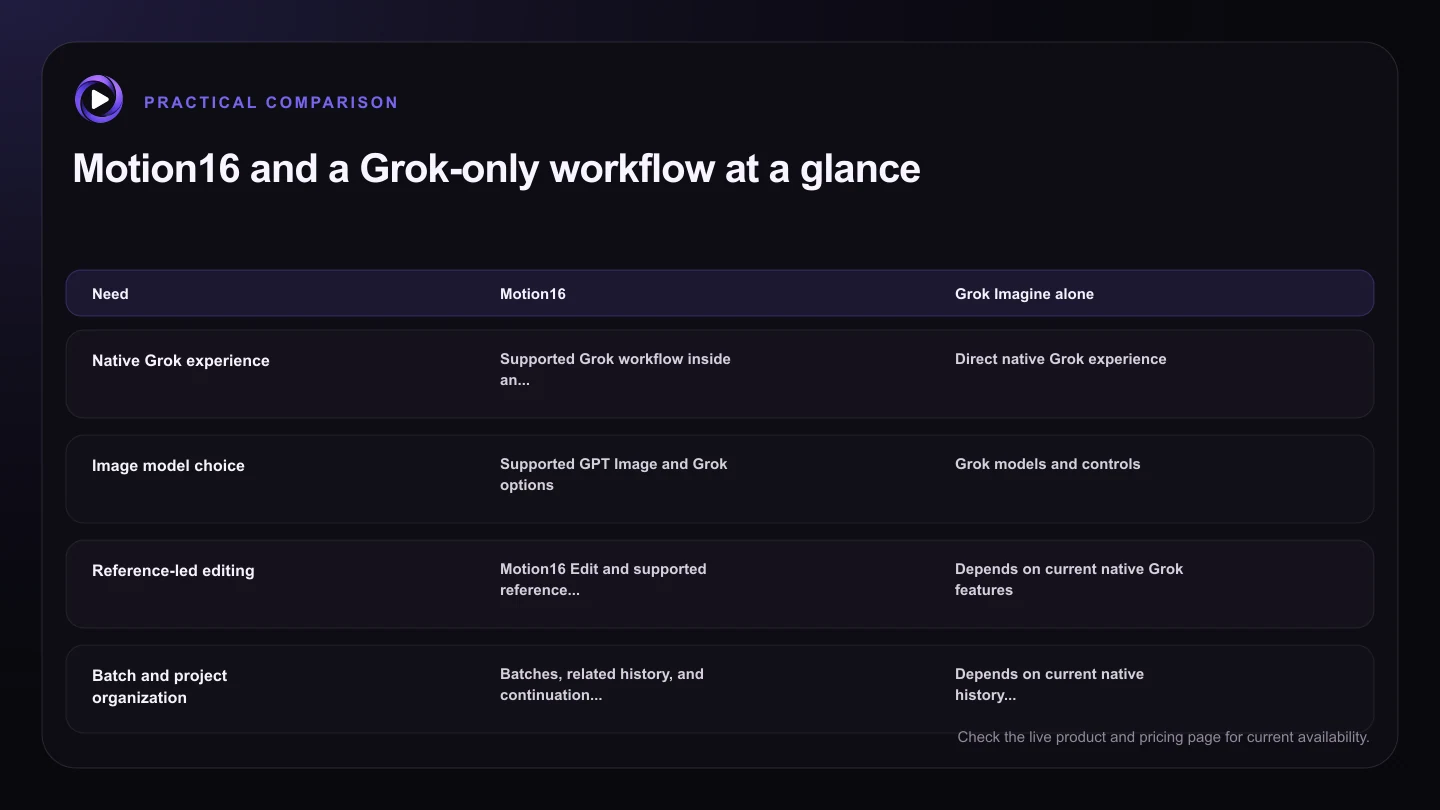
| Need | Motion16 | Grok Imagine alone |
|---|---|---|
| Native Grok experience | Supported Grok workflow inside an independent workspace | Direct native Grok experience |
| Image model choice | Supported GPT Image and Grok options | Grok models and controls |
| Reference-led editing | Motion16 Edit and supported reference workflows | Depends on current native Grok features |
| Batch and project organization | Batches, related history, and continuation actions | Depends on current native history and interface |
| Image-to-video handoff | Continue from a selected project image when supported | Use the available native Grok flow |
Model choice can help when the brief changes
One model may interpret a particular product setup, graphic idea, or cinematic scene better than another. Access to supported GPT Image and Grok image options lets you compare approaches without turning the project into a chain of unrelated tabs.
Model choice is useful only when it stays understandable. Pick a provider for a reason, compare the output against the brief, and avoid assuming that one model is universally better.
History matters more as the project grows
A quick one-off image may not need much organization. A campaign with references, batches, edits, alternate crops, and video attempts does. At that point, the prompt and source relationships become part of the creative asset.
Motion16 project history helps you revisit those relationships. You can compare results and continue from a prior image instead of relying on file names and memory.
Limits and service availability still apply
A workspace cannot make provider capacity infinite. Available models, queue behavior, resolutions, durations, and plan allowances may change. Review the live interface before planning a large or urgent job.
The best choice is the one that fits the current task. Test the same representative prompt in the workflows you are considering, then compare output quality, control, organization, and the effort required to reach a usable final asset.
Try this next
Which route fits your project?
- List whether you need one output or a multi-stage project.
- Check whether references and focused editing are important.
- Decide if comparing GPT Image and Grok results would help.
- Confirm whether the still needs to become a video.
- Review current limits, queues, settings, and plan information.
- Test one representative prompt before moving the whole project.
Frequently asked questions
Is Motion16 affiliated with Grok or xAI?
No. Motion16 is an independent workspace. References to Grok describe supported media workflows and comparisons, not an affiliation or endorsement.
Does Motion16 always produce better images than Grok Imagine?
No. Output quality depends on the prompt, source material, model, settings, and your goal. Motion16's advantage is the connected workflow and supported model choice, not a guarantee that every result wins.
When should I use Grok Imagine directly?
Use it directly when you prefer the native experience and do not need Motion16's broader project history, model choices, batch comparison, editing flow, or connected image-to-video handoff.
Keep exploring: Read What Does Motion16 Offer That Grok Imagine Does Not?, or check the current Motion16 plans and limits.